Introduction
Layout Breakouts with CSS Grid have gained considerable popularity. They allow content to be positioned across the full viewport in a page layout with a constrained maximum width.

Before CSS Grid, several solutions existed for implementing this type of layout. However, it was necessary to account for the browser scrollbars.
You can find several solutions for this page layout using CSS Grid here:
- www.joshwcomeau.com/
css/full-bleed/ - ryanmulligan.dev/blog/
layout-breakouts/ - smolcss.dev/#smol-breakout-grid
- layout-breakouts-builder.
vercel.app/
What struck me during my research was that although there are layouts with multiple tracks (for instance a normal content area, a wider feature column, and full bleed), all tracks are centered in a single-column layout.
This led me to ask myself: Can a classic design grid, such as one with 12 columns, be combined with Layout Breakouts?

In my current web project, I tried to implement this layout for the first time. And indeed, it is possible! The final version of the grid offers a lot of flexibility, but it also has its quirks.
In this tutorial, I will first present the basic version to explain the fundamental concept and the pitfalls I encountered. Then I will show you the final version.
Table of contents
- tl;dr
- Objectives and initial situation
- Keeping a constrained maximum width
- Responsive number of columns
- The first draft
- Drawbacks of this first version
- The complete and working solution
- The "column-gap" dilemma
- The new named grid lines
- Solutions with Subgrid
- Features and characteristics of the grid
- To be noted
- Conclusion
Keeping a constrained maximum width
On many websites, the page layout—and consequently the content—is limited to a specific width and then centered in the browser window. We want to achieve this as well.
Usually, the content area is placed in a wrapper or container element that is assigned a max-width and margin-inline: auto.
But in a Layout Breakout using CSS Grid, all columns have to stay part of the same grid parent element. So we can't use a wrapper element here.
This means we need another way to limit the page layout (which consists of several grid columns) to a maximum width.
Responsive number of columns
It is advisable to define the number of columns based on the viewport width. Twelve columns are convenient on larger screens, but too many on mobile devices. Most importantly, the width of all grid gaps (column-gap) will always exist. With 12 columns, that's 11 gaps of 24px (1.5rem) each, or 264px total width for the column gaps alone. Depending on the viewport, this can result in the grid becoming too wide.
This means that our grid will use 6, 8, or 12 columns depending on the viewport. We will need to take the changed number of columns into account when positioning the content. However, don't worry; the final version of the grid has a practical solution for this.
The breakpoints, column count, and gap widths used here are all exemplary and can be adapted to your project as needed.
The first draft
Well, how can we limit the page layout to a maximum width? By using some math! 🤓
Okay, I'm not really that great at math. But if we can't limit the width using wrappers, there is another solution: we determine the maximum width that a single column can have. We already know the width of the gutters (column-gap), which is 1.5rem in our example.
Let's work from the desired maximum width (here: 1400px). First, we need to subtract the spacing between the columns (column count minus 1). Then we divide the result by the column count. Voilà! We have found the maximum width of each column.
// Formula: calc((MAX-WIDTH – ((COLUMN-COUNT - 1) * GAP-SIZE)) / COLUMN-COUNT)
$columnWidth: calc((1400px – ((12 - 1) * 1.5rem)) / 12)
We can now use this calculated value in the grid with minmax(0, $columnWidth). This allows the grid to adapt responsively to the viewport.
Of course, we don't want to repeat the complete calculation multiple times in grid-template-columns and then also have to adjust it to the current number of columns per viewport. Therefore, we set all values via CSS Custom Properties:
:root {
    --sk-grid-padding: 4%;
    --sk-grid-max-width: 1400px;
    --sk-grid-gap: 1.5rem;
    --sk-grid-cols: 6;
    --sk-grid-col-size: calc((var(--sk-grid-max-width) - (var(--sk-grid-cols) - 1) * var(--sk-grid-gap)) / var(--sk-grid-cols));

    @media screen and (min-width: 768px) {
        --sk-grid-gap: 2rem;
        --sk-grid-cols: 8;
    }

    @media screen and (min-width: 1024px) {
        --sk-grid-cols: 12;
    }
}


.c-page-grid {
    display: grid;
    column-gap: var(--sk-grid-gap);
    grid-template-columns:
        [full-start]
            minmax(var(--sk-grid-padding), 1fr)
            [content-start]
                repeat(var(--sk-grid-cols), minmax(0, var(--sk-grid-col-size)))
            [content-end]
            minmax(var(--sk-grid-padding), 1fr)
        [full-end];
}
That looks pretty good already. And we can easily configure both the column count and gaps per viewport.
In our example, the two outer grid columns (for the Layout Breakout) are given a minimum width of 4% and a maximum width of 1fr. This ensures that the inner grid always has a margin to the viewport and is centered on the page.
With grid-column: content, we now align all content to the page layout in a first step:
.c-page-grid {
    > * {
        // Short for "grid-column: content-start / content-end";
        grid-column: content;
    }
}
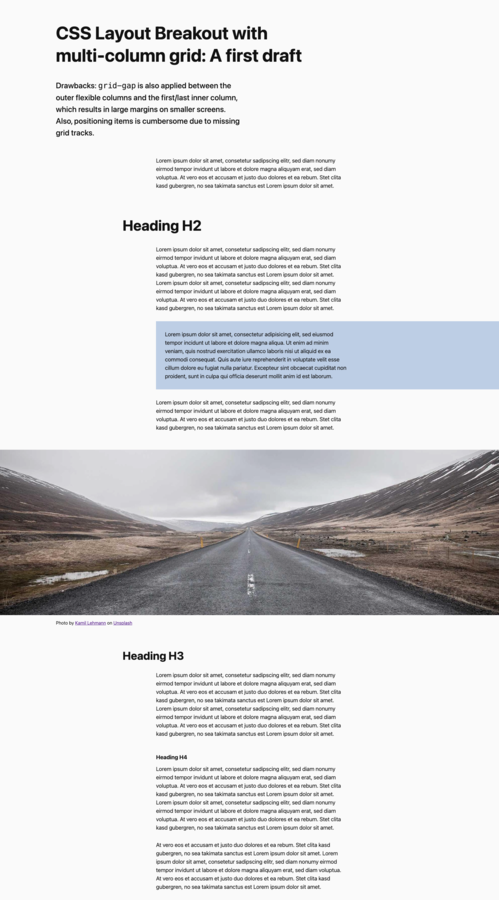
Of course, this is still boring, and we don't need a multi-column grid for this. The following CodePen therefore shows a slightly more interesting layout, in which headings and the introduction are positioned differently from the rest of the text. There are also two examples of layout breakouts: Open this pre-version on CodePen
Drawbacks of this first version
The current solution still has two problems, which we will solve in the next step:
- The column-gap property adds a consistent spacing between all columns, including the two outer columns. This creates more spacing than is preferred on smaller viewports.
- Currently, only two named grid tracks exist: “full” and “content". To align content with the other available columns in the grid system, we need to define this using the line number (grid-column: 3 / span 6;). And, in some cases, we may need to adjust this for specific viewports if the number of columns changes.

The complete and working solution
Oh well, now it gets extensive.
- We are adding tracks such as “heading” and “text” as named grid lines for easy positioning. In media queries, we set up the desired position for each track.
- And, although this may seem like a surprising move at first glance, we are replacing the column-gap property with real columns in the grid. This allows us to remove the spacing between the outer columns.
I will explain both changes in more detail below.
:root {
    --sk-grid-padding: 4%;
    --sk-grid-max-width: 1400px;
    --sk-grid-gap: 1.5rem;
    --sk-grid-cols: 6;
    --sk-grid-col-size: calc((var(--sk-grid-max-width) - (var(--sk-grid-cols) - 1) * var(--sk-grid-gap)) / var(--sk-grid-cols));

    @media screen and (min-width: 768px) {
        --sk-grid-gap: 2rem;
        --sk-grid-cols: 8;
    }

    @media screen and (min-width: 1024px) {
        --sk-grid-cols: 12;
    }
}


.c-page-grid {
    display: grid;
    grid-template-columns:
        [full-start] minmax(var(--sk-grid-padding), 1fr)
            [col-1-start content-start heading-start] minmax(0, var(--sk-grid-col-size)) [col-1-end]
                var(--sk-grid-gap)
            [col-2-start text-start] minmax(0, var(--sk-grid-col-size)) [col-2-end]
                var(--sk-grid-gap)
            [col-3-start] minmax(0, var(--sk-grid-col-size)) [col-3-end]
                var(--sk-grid-gap)
            [col-4-start] minmax(0, var(--sk-grid-col-size)) [col-4-end]
                var(--sk-grid-gap)
            [col-5-start] minmax(0, var(--sk-grid-col-size)) [col-5-end]
                var(--sk-grid-gap)
            [col-6-start] minmax(0, var(--sk-grid-col-size)) [col-6-end content-end heading-end text-end]
        minmax(var(--sk-grid-padding), 1fr) [full-end];

    @media screen and (min-width: 768px) {
        grid-template-columns:
            [full-start] minmax(var(--sk-grid-padding), 1fr)
                [col-1-start content-start heading-start] minmax(0, var(--sk-grid-col-size)) [col-1-end]
                    var(--sk-grid-gap)
                [col-2-start text-start] minmax(0, var(--sk-grid-col-size)) [col-2-end]
                    var(--sk-grid-gap)
                [col-3-start] minmax(0, var(--sk-grid-col-size)) [col-3-end]
                    var(--sk-grid-gap)
                [col-4-start] minmax(0, var(--sk-grid-col-size)) [col-4-end]
                    var(--sk-grid-gap)
                [col-5-start] minmax(0, var(--sk-grid-col-size)) [col-5-end]
                    var(--sk-grid-gap)
                [col-6-start] minmax(0, var(--sk-grid-col-size)) [col-6-end]
                    var(--sk-grid-gap)
                [col-7-start] minmax(0, var(--sk-grid-col-size)) [col-7-end text-end]
                    var(--sk-grid-gap)
                [col-8] minmax(0, var(--sk-grid-col-size)) [col-8-end content-end heading-end]
            minmax(var(--sk-grid-padding), 1fr) [full-end];
    }

    @media screen and (min-width: 1024px) {
        grid-template-columns:
            [full-start] minmax(var(--sk-grid-padding), 1fr)
                [col-1-start content-start] minmax(0, var(--sk-grid-col-size)) [col-1-end]
                    var(--sk-grid-gap)
                [col-2-start] minmax(0, var(--sk-grid-col-size)) [col-2-end]
                    var(--sk-grid-gap)
                [col-3-start heading-start] minmax(0, var(--sk-grid-col-size)) [col-3-end]
                    var(--sk-grid-gap)
                [col-4-start text-start] minmax(0, var(--sk-grid-col-size)) [col-4-end]
                    var(--sk-grid-gap)
                [col-5-start] minmax(0, var(--sk-grid-col-size)) [col-5-end]
                    var(--sk-grid-gap)
                [col-6-start] minmax(0, var(--sk-grid-col-size)) [col-6-end]
                    var(--sk-grid-gap)
                [col-7-start] minmax(0, var(--sk-grid-col-size)) [col-7-end]
                    var(--sk-grid-gap)
                [col-8-start] minmax(0, var(--sk-grid-col-size)) [col-8-end]
                    var(--sk-grid-gap)
                [col-9-start] minmax(0, var(--sk-grid-col-size)) [col-9-end text-end]
                    var(--sk-grid-gap)
                [col-10-start] minmax(0, var(--sk-grid-col-size)) [col-10-end]
                    var(--sk-grid-gap)
                [col-11-start] minmax(0, var(--sk-grid-col-size)) [col-11-end]
                    var(--sk-grid-gap)
                [col-12-start] minmax(0, var(--sk-grid-col-size)) [col-12-end content-end heading-end]
            minmax(var(--sk-grid-padding), 1fr) [full-end];
    }
}
In this CodePen, the final grid is applied with a variety of content: Final Grid layout on CodePen
If you'd like to check out an intermediate step: Here, the first grid lines have been added, but the column-gap has not yet been replaced: Second pre-version on CodePen


The "column-gap" dilemma
Let's first discuss column gutters. As demonstrated above, the column-gap behavior was an issue.
I therefore decided to implement the gaps using actual grid columns.
- Advantage: The extra space to the outer columns has been removed
- Downside: The use of the keyword span (e.g. grid-column: content-start / span 4;) is unfamiliar, as the “gap columns” now have to be included in the count.
In my opinion, the benefit outweighs the downside here. Auto-placement with span directly in the page grid would be difficult in general, as the outer, flexible columns would also be taken into account. But this can still be implemented using a separate grid in a child element, as shown in the “Card Group” examples in CodePen.
The new named grid lines
Granted, configuring the grid using grid-template-columns has become significantly more complex and now requires the use of media queries. There are two reasons for this: The new "gap columns" prevent us from using the repeat() function. However, we can turn this to our advantage by setting named grid lines for each column.
The named grid lines allow us to position the various contents more easily. You could position these differently in the grid for each viewport as you wish, and also have several tracks start or end in the same column.
We set a start and end point for each track, for example, [text-start] and [text-end].
And another thing:
[col-1-start content-start] minmax(0, var(--sk-grid-col-size)) [col-1-end]Adding [col-N-start] and [col-N-end] to each “real” grid column not only highlights them in grid-template-columns, making them easier to distinguish from the “gap columns.”
More importantly, you can use them to work around another problem: the line numbering in the grid always starts at the far left. In the Layout Breakout, this is the outer, flexible column.
Line number 2 corresponds to the start of the inner grid. By defining it as [col-1-start], we get a more intuitive numbering in the grid.
An element with grid-column: col-2 / col-5 will automatically start at [col-2-start] and end at [col-5-end].

Solutions with Subgrid
Subgrid is part of Baseline 2023; all browser versions released since September 2023 support the CSS feature.
Using grid-template-columns: subgrid, we can inherit the grid to child elements. The CodePen demo shows this with two examples:
The blue teaser box stretches to the right edge of the viewport. Its content is still bound to the "text" track by subgrid.
.c-teaser-box {
    background: #bdcee5;
    grid-column: text-start / full-end;
    display: grid;
    grid-template-columns: subgrid;
    margin-bottom: 2rem;
}

.c-teaser-box__content {
    padding: var(--sk-grid-gap);
    padding-right: 0;
    grid-column: text-start / text-end;

    > *:last-child {
        margin-bottom: 0;
    }
}
<div class="c-teaser-box">
<div class="c-teaser-box__content">
<p>Some content.</p>
</div>
</div>The full-bleed image covers the entire viewport width. However, we align the <figcaption> content in the "text" track. As we can see, Subgrid can also be inherited multiple times for this purpose:
.c-full-bleed--image {
    margin-block: 2rem;
    grid-template-columns: subgrid;
    display: grid;
    grid-column: full;

    img {
        height: calc(30rem + 16vw);
        max-height: 80vh;
        object-fit: cover;
        width: 100%;
        grid-column: full;
    }

    figcaption {
        font-size: .8em;
        margin-top: 1rem;
        display: grid;
        grid-template-columns: subgrid;
        grid-column: text;
    }

    .c-figcaption-content {
        grid-column: text;
    }
}
<figure class="c-full-bleed c-full-bleed--image">
<img src="https://picsum.photos/id/379/2400/900" alt="Photo of an empty asphalt road through mountains">
<figcaption>
<div class="c-figcaption-content">
Photo by <a href="https://unsplash.com/photos/empty-asphalt-road-through-mountain-2f5Ktwb8YXk" target="_blank">
Kamil Lehmann</a> on <a href="https://unsplash.com/" target="_blank">Unsplash</a>
</div>
</figcaption>
</figure>Features and characteristics of the grid
- Configurable maximum width of the inner page layout
- Flexible columns on the left/right for Full Bleed positioning
- Grid line names (tracks) for frequently used positions (like "Heading", "Content").
- Numbered line names for special use cases
- Responsive columns (e.g. mobile: 6, tablet: 8, desktop: 12)
To be noted
Applies specifically to this grid solution: Since column gaps are implemented using actual columns, they must be accounted for when using the span keyword (grid-column: content-start / span 4;).
Applies to all grid layouts where the number of columns changes per viewport: When using line-based placement (grid-column: 6 / 9; or grid-column: col-6 / col-9;), the grid content may need to be repositioned (using media queries). For example, a ninth column is only available from a width of 1024px in the presented grid.
It helps to align content primarily to self-defined grid lines, such as "text".
Conclusion
This grid layout is certainly not for everyday use. However, it might be helpful for more unusual page layouts. And it was fun to create this solution.
In a second part, I will add components to this grid that allow images to flow around text. The goal, of course, is to keep the text and images aligned with the grid. float cannot be used directly in a CSS grid, so there will be another little trick involved.
When I find the time, I will create a couple of unusual layouts with this grid on CodePen.
One last remark: depending on the layout, a CSS grid doesn't have to be that complicated. The "Layout Breakout" solutions linked above will get you quite far. You could position content from [full-start] to [content-end] to achieve an asymmetrical layout much more easily.
I am very interested in your feedback! Did I overcomplicate things? Can you think of a use case for this? Do you have a better solution for the column-gap issue? Please write to me on Mastodon or email me!